Solving LMDB Version Incompatibility in PowerDNS: A Post-Mortem
As system administrators, we often pride ourselves on maintaining "zero-downtime" environments. However, upgrading core system libraries—specifically those handling database engines like LMDB—can sometimes lead to silent incompatibilities that threaten the integrity of our services.

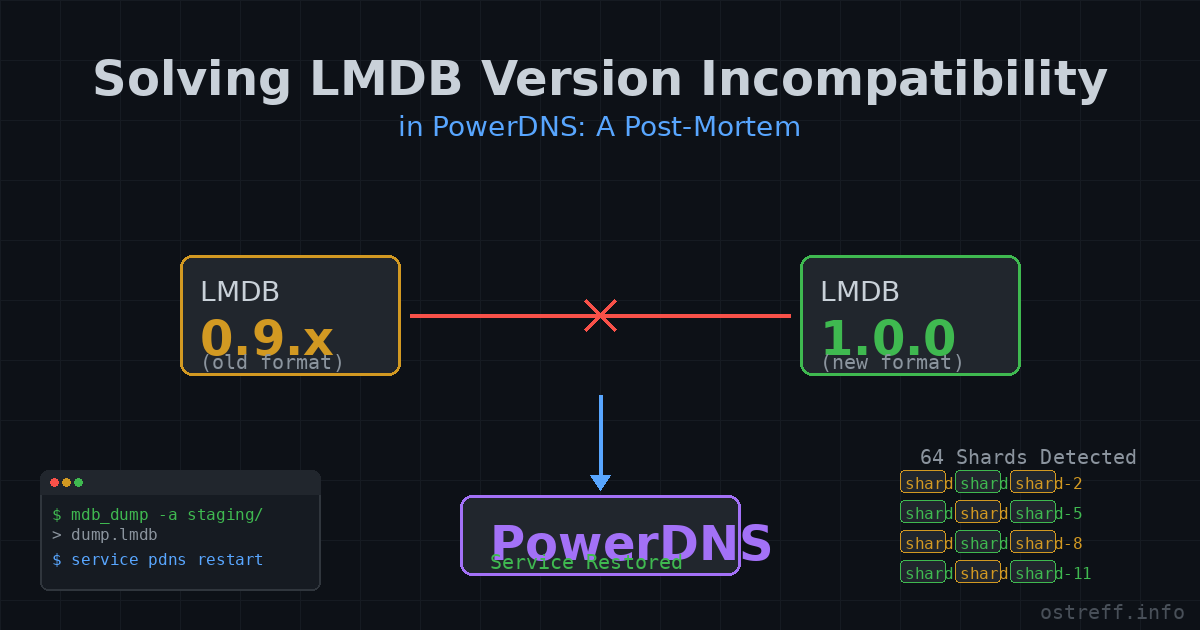
Recently, I encountered a critical issue after a routine system upgrade: my PowerDNS instance was running on a newer version of liblmdb (1.0.0), while the existing database files were created with an older 0.9.x version. Here is how I navigated the transition, recovered the data, and cleaned up the environment.
The Challenge
When upgrading the base system, the liblmdb library transitioned to version 1.0.0. Because PowerDNS uses an LMDB backend, the discrepancy between the on-disk file format and the new library version created an immediate risk of data corruption. Simply restarting the service was not a safe option; we needed to ensure the data was compatible with the new ABI.
Step 1: Data Extraction
The biggest obstacle was the LMDB file structure. PowerDNS uses a sharded storage approach (multiple .lmdb files), and standard tools like mdb_dump expect a directory rather than a file path, resulting in the dreaded mdb_env_open failed, error 20: Not a directory.
To solve this, I performed a "staging" operation:
- Created a temporary directory structure mimicking an LMDB environment.
- Copied each individual shard (
pdns.lmdb,pdns.lmdb-1, etc.) into this temporary space, renaming them todata.mdb. - Executed
mdb_dumpon the temporary folder to extract the data into a safe, text-based format.
Step 2: Verification and Cleanup
Once the data was safely backed up, I cleaned the environment. Over the years, the directory had accumulated legacy SQLite artifacts from a previous migration. Since the PowerDNS configuration (pdns.conf) was explicitly set to use the lmdb backend (launch=lmdb), I moved the unused SQLite files to an archive directory, significantly decluttering the system.
Step 3: Re-integration
With the service stopped, I ensured that all file permissions were correctly set to the bind user. Upon restarting the service, PowerDNS detected the existing shard files. Even though my configuration specified lmdb-shards=1, the engine intelligently detected the 64 shards on disk and adapted accordingly, successfully loading the backend without data loss.
Practical Implementation: The Migration Script
To automate the data extraction without hardcoding paths or shard counts, we can extract the database location directly from pdns.conf. The following sh script demonstrates how to safely dump all shards regardless of their number.
The Final Migration Tool
This sh script handles the entire lifecycle of the migration process:
- Tool Discovery: Automatically finds and extracts legacy
mdb_dumpversions from your package backups (/usr/ports/packages/). - Data Integrity: Performs a "Stage-Dump-Load" operation, ensuring the new database format is created natively by the current system tools.
- Safety First: Includes multiple sanity checks (root user verification, path safety, and non-destructive cleanup options).
- Environment Awareness: Dynamically identifies PowerDNS ownership and permissions to ensure the service resumes seamlessly after migration.
#!/bin/sh

set -e

# Ensure script is run as root
if [ "$(id -u)" -ne 0 ]; then
    echo "Error: This script must be run as root."
    exit 1
fi

# Configuration
CONFIG="/usr/local/etc/pdns/pdns.conf"
TIMESTAMP=$(date +%Y%m%d_%H%M%S)
BACKUP_DIR="/tmp/pdns_lmdb_backup_${TIMESTAMP}"
STAGING_DIR="/tmp/pdns_migrate_staging_${TIMESTAMP}"
NEW_DB_DIR="/tmp/pdns_migrate_newdb_${TIMESTAMP}"
LEGACY_DIR="/tmp/legacy_tools"
PKG_DIR="/usr/ports/packages/portmaster-backup"
SYSTEM_DUMP="/usr/local/bin/mdb_dump"
SYSTEM_LOAD="/usr/local/bin/mdb_load"

# Verify config exists
if [ ! -f "$CONFIG" ]; then
    echo "Error: Configuration file $CONFIG not found!"
    exit 1
fi

# Extract DB path from pdns.conf
DB_PATH=$(grep "^lmdb-filename" "$CONFIG" | cut -d'=' -f2 | tr -d ' ')
if [ -z "$DB_PATH" ]; then
    echo "Error: Could not determine lmdb-filename from $CONFIG"
    exit 1
fi
DB_DIR=$(dirname "$DB_PATH")

# 1. Detect available legacy packages
echo "Searching for lmdb packages in $PKG_DIR..."
PKGS=$(ls "$PKG_DIR"/lmdb-*.pkg 2>/dev/null || true)

if [ -z "$PKGS" ]; then
    echo "No legacy packages found. Using system default mdb_dump."
    MDB_DUMP_BIN="$SYSTEM_DUMP"
else
    echo "Found the following packages:"
    i=1
    set -- $PKGS
    for p in "$@"; do
        echo "$i) $(basename "$p")"
        i=$((i + 1))
    done

    printf "Select a package to extract mdb_dump from (or press Enter to use system default): "
    read -r choice

    if [ -n "$choice" ] && [ "$choice" -ge 1 ] && [ "$choice" -le "$#" ]; then
        SELECTED_PKG=$(eval echo \${$choice})
        echo "Extracting mdb_dump from $(basename "$SELECTED_PKG")..."

        mkdir -p "$LEGACY_DIR"
        tar -xf "$SELECTED_PKG" -C "$LEGACY_DIR" usr/local/bin/mdb_dump
        MDB_DUMP_BIN="$LEGACY_DIR/usr/local/bin/mdb_dump"
    else
        MDB_DUMP_BIN="$SYSTEM_DUMP"
    fi
fi

# Verify binaries exist and are executable
if [ ! -x "$MDB_DUMP_BIN" ]; then
    echo "Error: $MDB_DUMP_BIN is not executable."
    exit 1
fi
if [ ! -x "$SYSTEM_LOAD" ]; then
    echo "Error: $SYSTEM_LOAD not found."
    exit 1
fi

echo "Using dump binary: $($MDB_DUMP_BIN -V 2>&1 | head -n 1)"

# 2. Stop PowerDNS service to prevent active writes during copy
echo "Stopping PowerDNS service..."
service pdns stop || true

# Проверка дали процесът наистина е спрял
if pgrep -q pdns_server; then
    echo "Error: PowerDNS is still running! Please stop it manually before proceeding."
    exit 1
fi

mkdir -p "$BACKUP_DIR" "$STAGING_DIR" "$NEW_DB_DIR"

echo "Dumping database files from $DB_DIR..."

# Process the main file and all shards
for file in "$DB_DIR"/pdns.lmdb*; do
    [ -e "$file" ] || continue
    case "$file" in
        *-lock) continue ;;
    esac

    filename=$(basename "$file")
    DUMP_FILE="$BACKUP_DIR/${filename}.dump"

    rm -f "$STAGING_DIR/data.mdb"
    cp "$file" "$STAGING_DIR/data.mdb"

    echo "Dumping $filename -> $(basename "$DUMP_FILE")..."
    "$MDB_DUMP_BIN" -a "$STAGING_DIR" > "$DUMP_FILE"
done

# 3. Load dumps into staging DB location using explicit sub-database support (-s)
echo "Recreating database structure in temporary location ($NEW_DB_DIR)..."
for dump in "$BACKUP_DIR"/*.dump; do
    [ -e "$dump" ] || continue
    target=$(basename "$dump" .dump)

    # Extract sub-database names from header
    SUB_DBS=$(grep "^database=" "$dump" | cut -d'=' -f2 || true)

    if [ -n "$SUB_DBS" ]; then
        echo "Loading $target with sub-databases:"
        for db in $SUB_DBS; do
            echo "  -> Sub-database: $db"
            "$SYSTEM_LOAD" -f "$dump" -n -s "$db" "$NEW_DB_DIR/$target" 2>/dev/null
        done
    else
        echo "Loading $target (standalone)..."
        "$SYSTEM_LOAD" -f "$dump" -n "$NEW_DB_DIR/$target"
    fi
done

# Safety check: Verify that new database file was generated
if [ ! -f "$NEW_DB_DIR/pdns.lmdb" ]; then
    echo "Error: Database creation failed! Original files in $DB_DIR were NOT modified."
    service pdns start
    exit 1
fi

# 4. Safe Archive & Replace
OLD_SAVE_DIR="$DB_DIR/old_lmdb_backup_${TIMESTAMP}"
echo "Archiving original database files to $OLD_SAVE_DIR..."
mkdir -p "$OLD_SAVE_DIR"
mv "$DB_DIR"/pdns.lmdb* "$OLD_SAVE_DIR/"

echo "Deploying new LMDB 1.0 database files..."
cp "$NEW_DB_DIR"/pdns.lmdb* "$DB_DIR/"

# 5. Apply permissions
PDNS_USER=$(grep "^setuid" "$CONFIG" | cut -d'=' -f2 | tr -d ' ')
PDNS_GROUP=$(grep "^setgid" "$CONFIG" | cut -d'=' -f2 | tr -d ' ')

[ -z "$PDNS_USER" ] && PDNS_USER=$(ls -ld "$DB_DIR" | awk '{print $3}')
[ -z "$PDNS_GROUP" ] && PDNS_GROUP=$(ls -ld "$DB_DIR" | awk '{print $4}')

echo "Applying permissions ($PDNS_USER:$PDNS_GROUP) on $DB_DIR..."
chown -R "$PDNS_USER:$PDNS_GROUP" "$DB_DIR"

# Cleanup staging area
rm -rf "$STAGING_DIR" "$NEW_DB_DIR" "$LEGACY_DIR"

# 6. Service start & verification
echo "Starting PowerDNS service..."
service pdns start

echo "Migration finished successfully."
echo "Original files kept safely in: $OLD_SAVE_DIR"
echo "Recent log entries:"
tail -20 /var/log/messages | grep pdns || true
Lessons Learned
- Don't ignore the ldd output: Checking which shared libraries your binaries are actually linking against is the first step in diagnosing versioning conflicts.
- Staging is your best friend: When dealing with strict tool requirements (like
mdb_dumpexpecting directories), manual staging is the safest way to perform a low-level migration. - Clean house: If you have migrated from SQLite to LMDB in the past, don't leave the old files sitting in your production directory. They only increase the complexity of backups and debugging.
Final Thoughts
Upgrading database engines doesn't always have to be a "break-and-fix" cycle. By preparing a solid backup, understanding the underlying storage structure, and verifying the service logs post-restart, you can perform complex migrations while keeping your DNS infrastructure rock-solid.
The FreeBSD mentioned this in /usr/ports/UPDATING article:
20260702:
  AFFECTS: users of databases/lmdb
  AUTHOR: delphij@FreeBSD.org

  LMDB 1.0 introduced an incompatible on-disk file format change.
  Versions 0.9.x and 1.0.x databases are mutually incompatible.

  Before upgrading, export all existing databases using the old v0.9
  mdb_dump utility, then import them with the new v1.0 mdb_load after
  upgrading.  There is no support for opening v0.9 database files
  directly with LMDB 1.0.

  Example migration procedure:
  # mdb_dump -a /path/to/db > /tmp/mydb.dump
  # pkg upgrade databases/lmdb
  # mdb_load -f /tmp/mydb.dump /path/to/newdb
Tags: #PowerDNS #LMDB #SystemAdministration #FreeBSD #DatabaseMigration #DevOps