How can you use Beszel on FreeBSD?
I am applying hear ready-made beszel-agent and beszel-hub compiled by me, on freebsd 15 amd64, using go 1.26.1

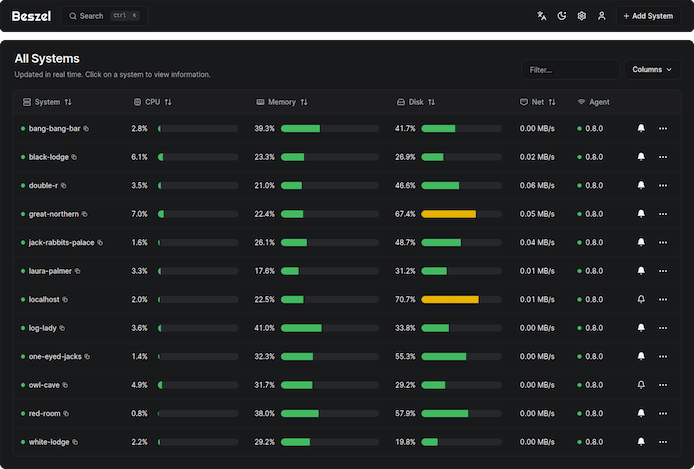
I hope you can run Beszel not only under freebsd 15, because of its ability to depend on almost no dynamic libraries. The problems I encountered when trying to compile the project using https://github.com/henrygd/beszel were due to the peculiarities of nodejs and its specific libraries used into project.
Unpack the archive ( attached to bottom ), and move the files you will use to the correct location on your file system. Here are the files you can expect to find in the archive.
a -rwxr-xr-x  1 root   wheel 8675603  8 март 11:29 usr/local/bin/beszel-agent
a -rwxr-xr-x  1 root   wheel 32629011  8 март 12:18 usr/local/bin/beszel-hub
a -rwxr-xr-x  1 root   wheel     1822  7 март 23:09 usr/local/etc/rc.d/beszel_agent
a -rwxr-xr-x  1 root   wheel     1482  7 март 23:31 usr/local/etc/rc.d/beszel_hub
a -rw-r--r--  1 root   wheel       74  7 март 23:10 usr/local/etc/newsyslog.conf.d/beszel_agent.conf
a -rw-r--r--  1 root   wheel       72 10 март 10:50 usr/local/etc/newsyslog.conf.d/beszel_hub.conf
If you are going to use both, then you will need to add first beszel-hub to your rc.d like this:
pw useradd beszel -d /nonexistent -s /usr/sbin/nologin -c "Beszel"

sysrc beszel_hub_enable=YES
service beszel_hub start
by default, bezel-hub starts at 127.0.0.1:8090. It's a good idea to use some sort of reverse proxy, I use caddy and my minimal configuration looks like this:
beszel.<your-sub-domain-here> {
    encode gzip zstd

    @dashboard {
        path /_/*
    }
    @api {
        path /api/*
    }

    reverse_proxy 127.0.0.1:8090

    log {
        output file /var/log/caddy/beszel.log {
            roll_size 10mb
            roll_keep 10
            roll_keep_for 720h
        }
        format console
    }
}- It is not mandatory to generate a separate log file of course.
access the web interface and after creating the superadmin account you will see a "+" button at the top where you can add the agents you want to visualize. The important thing here is to be careful when creating a new agent, to create/copy certain things into your configuration files located in /usr/local/etc/

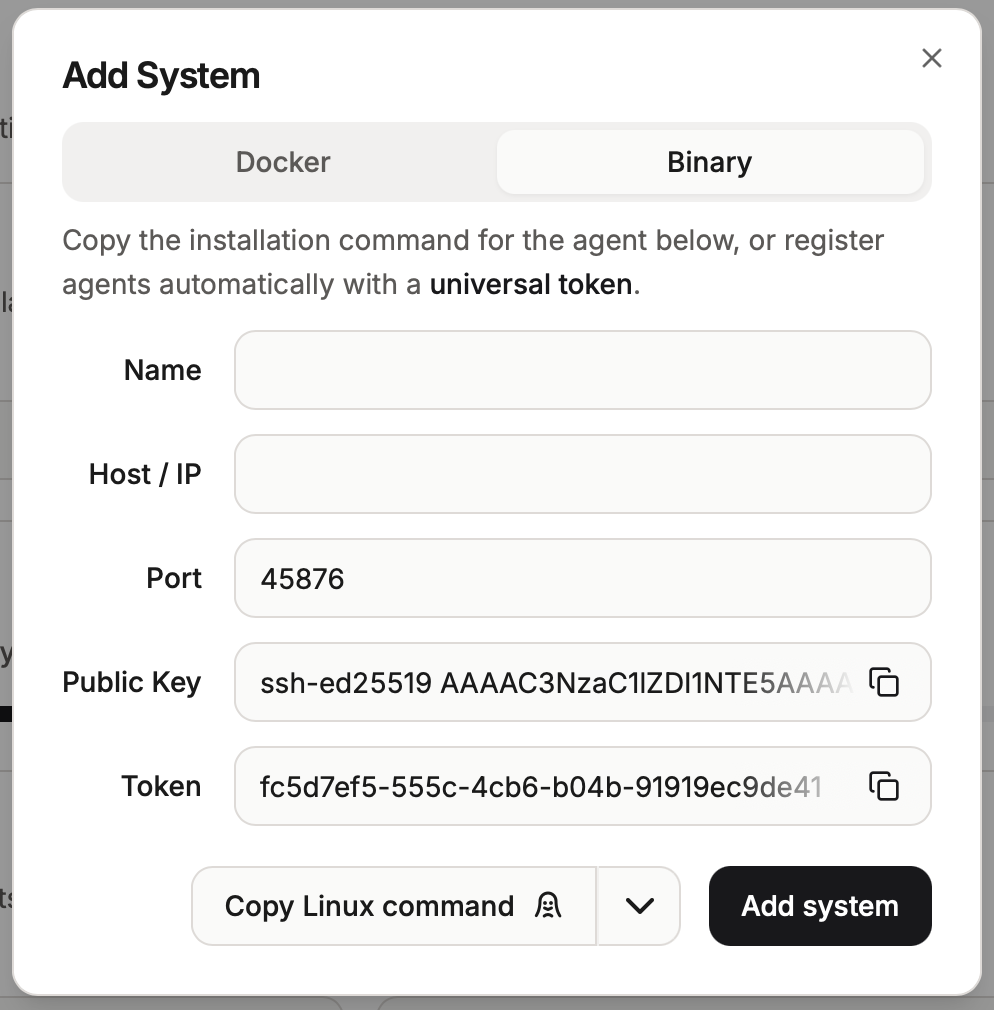
The contents of the public key field should be placed in /usr/local/etc/beszel_agent_key.pub , and the contents of the token field in the file /usr/local/etc/beszel_agent.secret. Please fulfil correct host/ip for sure and name can be anything descriptive for you. For security reasons, it's a good idea for your files to have the following permissions:
-r--------  1 beszel wheel 81  7 март  23:04 /usr/local/etc/beszel_agent_key.pub
-r--------  1 beszel wheel 37  7 март  23:04 /usr/local/etc/beszel_agent.secret
Lets start beszel-agent then, it depends did you have already beszel uid created. Don't forget to configure the url of your beszel-hub:
pw useradd beszel -d /nonexistent -s /usr/sbin/nologin -c "Beszel"

sysrc beszel_agent_url="https://beszel.<your-sub-domain-here>"
sysrc beszel_agent_enable=YES
service beszel_agent start
*be careful because into /usr/local/etc/rc.d/beszel_agent it's hardcoded by default to use my own beszel-hub url.
Finally here is the my binary:
- This program can only be run on AMD64 processors with v4 microarchitecture support.
I also add how you can build your own binary packages for your architecture and processor type. You must have go and git installed. You will need also prebuilded by me web interface ( nodejs ). It's here:
Execute commands in folder where you have space to build the binary:
fetch https://ostreff.info/content/files/2026/03/site-dist.tgz

git clone https://github.com/henrygd/beszel.git

cd beszel/internal/site ; tar zxvf ../../../site-dist.tgz

cd ../..

go build -ldflags "-w -s" -o build/beszel-hub ./internal/cmd/hub

go build -ldflags "-w -s" -o build/beszel-agent ./internal/cmd/agent

install -m 755 build/beszel-agent /usr/local/bin/beszel-agent

install -m 755 build/beszel-hub /usr/local/bin/beszel-hub